
If you pay an extra $9.99 monthly for YouTube TV 4K Plus, you probably expect pristine ultra-high-definition live sports every weekend. The reality is that genuine native 4K broadcasts are virtually absent from the platform’s live television schedule.
Most marquee games billed as 4K broadcasts are actually 1080p feeds converted to ultra-high-definition before delivery. Our analysis reveals that true 4K vs upscaled sports streaming leaves subscribers paying top dollar for fewer than two native broadcasts each quarter.
You are likely spending $119.88 per year for video upscaling that your 4K smart TV—a television with built-in internet connection and apps—could process on its own.

Decoding the Broadcast Signal: True 4K vs Upscaled Sports Streaming
Live streaming—watching video content over the internet instead of cable or satellite—promises cutting-edge picture quality. Yet marketing promotions obscure the technical boundary separating true 4K from upscaled feeds.
Navigating these technical nuances is a crucial step when planning cord cutting for sports fans without overspending on video quality.
Before evaluating specific broadcasts, it helps to review which streaming services offer 4K and HDR content across their live channel lineups.
Cord-cutting—canceling traditional cable or satellite TV in favor of streaming services—often leads sports fans directly to YouTube TV. Many immediately buy the 4K Plus add-on to unlock higher fidelity.
A native 4K broadcast captures action using cameras equipped with 3840×2160 pixel sensors. Every switchboard, replay server, and graphic overlay in the production truck processes that full 8.3-million-pixel image.
In contrast, upscaled broadcasts record the game in 1080p high definition at 60 frames per second. Broadcasters then route that 2.1-million-pixel signal through digital processors to inflate the resolution before transmission.
According to technical reporting from CNET, major broadcast networks frequently prioritize high dynamic range (HDR) color over raw pixel counts. Producing a game in 1080p HDR requires far less transmission bandwidth than full 4K.
HDR dramatically enhances contrast, shadow details, and color saturation on compatible displays. However, an upscaled HDR image does not deliver genuine 4K edge definition or fine textural clarity.
When you connect a dedicated streaming device—a small box or stick (like Roku or Fire TV) that adds streaming to any TV—it receives an inflated signal rather than true sensor detail.

YouTube TV 4K Event Schedule: Dissecting the Broadcaster Lineup
To determine if the YouTube TV 4K Plus add-on is worth it, you must evaluate the actual youtube tv 4k event schedule across an entire sporting calendar. Live 4K channels on the service sit idle most days.
If live event variety is your primary concern, our DirecTV Stream review details how rival services handle dedicated 4K event channels and regional sports networks.
YouTube TV activates designated 4K overflow channels only when an authorized broadcast partner supplies an external feed. On typical weekdays outside major golf or tennis tournaments, you will find zero live events scheduled.
The platform supplements these scarce sports broadcasts with limited on-demand programming—content you can watch whatever you want, whenever you want—from Discovery, FX, and Tastemade.
These on-demand assets consist primarily of nature documentaries, home renovation programs, and cooking shows. Very few sports enthusiasts pay an extra monthly fee to watch recorded lifestyle series in ultra-high definition.
During the autumn sports surge, the live schedule peaks on Saturdays with college football. Even during this intense window, YouTube TV rarely provides more than three simultaneous live 4K games across all sports channels.
Midweek viewing drops off precipitously. Unless a partner network carries a high-profile basketball matchup, subscriber guides remain devoid of live ultra-high-definition listings from Monday through Thursday.
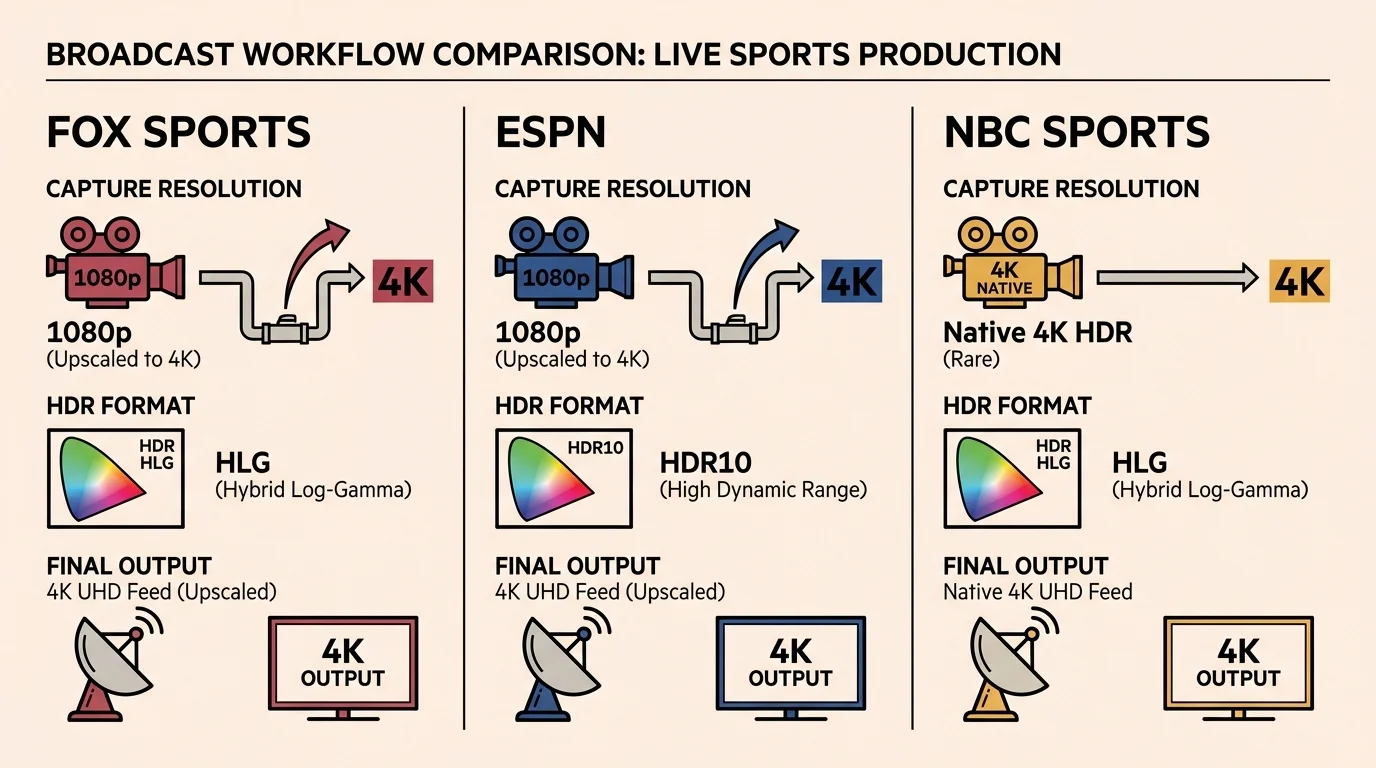
Network Breakdown: Fox, ESPN, and NBC Sports Delivery
Live sports distribution varies radically by network partner. Understanding each broadcaster’s technical limitations explains why true 4K vs upscaled sports streaming remains an ongoing frustration for sports viewers.
For college sports followers wanting more comprehensive coverage beyond linear broadcasts, our guide to ESPN Plus outlines what content is included on the standalone app.
If you are evaluating other live TV options, our FuboTV vs. YouTube TV comparison breaks down how alternative platforms package 4K sports events without charging separate monthly fees.
Fox Sports supplies the largest volume of high-profile events to YouTube TV 4K channels. Their lineup includes college football, the MLB Postseason, and marquee NFL holiday broadcasts.
However, Fox engineers produce these broadcasts natively in 1080p HDR at 60 frames per second. Fox then upscales the feed to 3840×2160 before distributing it to YouTube TV servers.
While Fox upscales with exceptional sharpness and rich HDR color, it remains an upscaled image. You are not receiving a native 4K camera feed during Fox NFL games or World Series matchups.
ESPN operates a dedicated 4K mobile production truck capable of native 3840×2160 capture. Unfortunately, ESPN distributes this signal in standard dynamic range (SDR) rather than modern HDR.
Without HDR, ESPN 4K games lack the vibrant color pop and deep contrast found on competing networks. ESPN also limits this costly production setup to roughly one college football game per week.
As detailed by Cord Cutters News, major ESPN properties like Monday Night Football do not broadcast in 4K on any platform.
NBC Sports delivers the truest native 4K sports experience currently available on YouTube TV. English Premier League soccer broadcasts originated by UK crews arrive in pristine 3840×2160 resolution with HDR10 enhancement.
NBC also broadcasts select Notre Dame home football games in native 4K. Regrettably, NBC Sunday Night Football—the highest-rated broadcast property in America—remains restricted to standard 1080i high definition.
CBS Sports does not provide any 4K feeds to YouTube TV. When CBS produces golf tournaments or NFL playoff games in 4K HDR, it restricts those streams to its proprietary apps.
| Network Channel | Capture Resolution | Color Standard | Audio Format | In-Season Monthly Volume | Feed Classification |
|---|---|---|---|---|---|
| FOX Sports 4K | 1080p at 60 fps | HDR10 / HLG | Dolby Digital 5.1 | 8 to 12 events | Upscaled 1080p |
| ESPN 4K | Native 2160p at 60 fps | SDR (Rec. 709) | Dolby Digital 5.1 | 3 to 5 events | True Native 4K |
| NBC Sports 4K | Native 2160p at 60 fps | HDR10 | Dolby Digital 5.1 | 4 to 6 events | True Native 4K |
| CBS Sports | 1080p at 60 fps (App only) | HDR10 | Dolby Atmos / 5.1 | 0 events | Unavailable on YouTube TV |

The Financial Math: Calculating Your Real Cost Per Native 4K Game
Base YouTube TV service costs $72.99 monthly. Adding the 4K Plus package adds an ongoing $9.99 monthly charge, totaling $119.88 per year in recurring costs.
Given recent industry-wide streaming price increases, auditing whether add-ons justify their recurring costs is more important than ever.
To evaluate this expense, consider a fully worked scenario during the peak fourth-quarter sports corridor from October 1 through December 31.
Over these 90 days, you pay $29.97 for the 4K Plus add-on across three monthly billing cycles. During this window, YouTube TV airs approximately 36 live sports broadcasts labeled as 4K.
Fox accounts for 24 of those games across college football and NFL coverage. Because Fox relies entirely on 1080p upscaling, none of these 24 broadcasts offer native 4K capture.
ESPN contributes six college football broadcasts captured natively in 4K SDR. NBC supplies six Premier League soccer matches captured in true native 4K HDR.
That leaves you with exactly 12 native 4K broadcasts over 90 days. Dividing your $29.97 quarterly fee across 12 games results in an effective cost of $2.50 per native broadcast.
The cost proposition deteriorates dramatically during the off-peak spring corridor from February through April. Across those three months, YouTube TV typically schedules fewer than four native 4K broadcasts in total.
Dividing that same $29.97 quarterly charge by four events raises your cost to $7.49 per native broadcast. If you do not watch Premier League soccer, your native 4K count drops to zero.
“Paying for 4K streaming only delivers real value if the source material captures raw pixels rather than artificially stretching a high-definition signal.” — Video Engineering Specialist

Beyond Resolution: Unlimited Home Streams and Offline DVR Downloads
Because live 4K games are rare, Google bundles two utility features into the 4K Plus add-on to justify the price. Evaluating these non-video perks is vital before canceling your plan.
To see how these concurrent stream limits and DVR options compare to other major providers, check out our YouTube TV vs. Hulu Live vs. Sling TV comparison.
First, the add-on removes the platform’s standard limit of three concurrent streams. On your home Wi-Fi network, your household can stream live television on an unlimited number of screens simultaneously.
Second, 4K Plus unlocks offline downloads for cloud DVR—a digital video recorder that lets you record and watch shows later. You can store recorded broadcasts directly on phones or tablets.
This offline DVR functionality operates across both ad-supported plans—plans that show commercials—and ad-free plans that cost more to eliminate ads. You simply download cloud recordings over Wi-Fi before traveling.
If you share a home with four or more active viewers, unlimited streaming alone may justify the $9.99 monthly fee. However, single viewers or two-person households derive zero practical benefit from expanded concurrent streams.
Similarly, offline downloads provide meaningful value only if you travel frequently or commute on transit without cellular reception. If your mobile devices stay connected to home broadband, offline viewing remains largely unused.
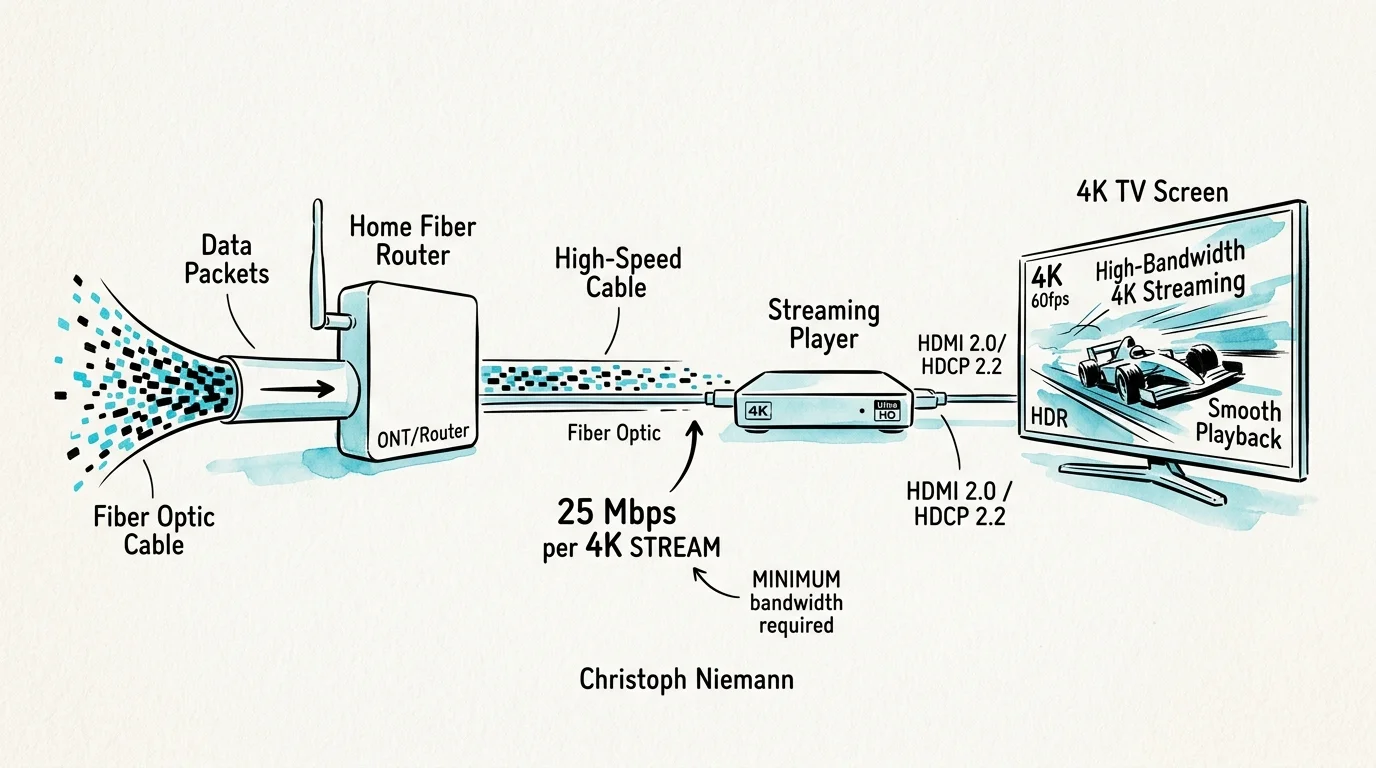
Hardware Compatibility and Bandwidth Demands for YouTube TV 4K
Viewing 4K streams on YouTube TV requires compatible playback hardware and sufficient home internet bandwidth. Not all 4K televisions handle the platform’s video streams equally.
YouTube TV relies on the VP9 Profile 2 and AV1 compression codecs to distribute 4K HDR video. Older 4K streaming sticks and legacy television processors often fail to decode these specific formats properly.
According to hardware analysis from The Verge, modern hardware like the Apple TV 4K (3rd Generation) or Roku Streaming Stick 4K handles 60-frame-per-second 4K HDR without frame drops.
Google recommends a dedicated, unthrottled download speed of at least 25 megabits per second for each active 4K stream. Lower speeds cause the app to automatically downgrade video to standard 1080p resolution.
You must also monitor home internet data allowances. While standard high-definition streaming consumes roughly 2.5 to 3.5 gigabytes of data per hour, live 4K streams consume between 7 and 15 gigabytes per hour.
If your internet service provider enforces a monthly data cap—such as the common 1.2-terabyte threshold—watching multiple 4K games weekly can trigger costly overage penalties.

How to Audit Your Viewing Habits and When to Cancel 4K Plus
Deciding whether to keep or cancel YouTube TV 4K Plus requires a practical audit of your household media habits. You can complete this review in four direct steps.
Step 1: Open your YouTube TV guide and review upcoming sporting events. Check whether the games you actually care about carry the designated 4K badge.
Step 2: Identify the network broadcasting those games. If Fox produces the game, recognize that you are paying for an upscaled 1080p feed rather than true ultra-high definition.
Step 3: Check your household streaming concurrency. If your family never watches more than three simultaneous streams at once, you do not need the unlimited streams feature.
Step 4: Review your mobile download history. If you have not downloaded a recorded show to your tablet or mobile phone over the past month, the offline DVR feature is wasted.
If you determine that 4K Plus fails this audit, you can cancel immediately without penalty. YouTube TV maintains your 4K benefits until the final day of your current monthly billing period.
To cancel, open YouTube TV in a web browser, select your profile icon, and open Settings. Click Membership, locate 4K Plus, uncheck the add-on, and confirm your cancellation.
Many cost-conscious cord-cutters utilize seasonal subscriptions instead. You can activate the add-on in October for college football rivalries and cancel before your November billing cycle renews.
Frequently Asked Questions
Can you watch Fox 4K sporting events for free without paying for 4K Plus?
Yes. You can log into the Fox Sports app on your streaming device using your standard YouTube TV credentials to stream Fox 4K events without purchasing the add-on.
Does YouTube TV broadcast NFL Sunday Ticket games in native 4K?
No. Sunday Ticket broadcasts are identical to regional CBS and Fox television feeds, meaning games air in standard 1080i or 720p resolution without 4K enhancement.
Does upscaled 1080p HDR look better than standard 1080p high definition?
Yes. Upscaled 1080p HDR offers superior color depth, better contrast, and a higher video bitrate, though it lacks the sharp edge definition of true native 4K.
Can you pause and resume 4K Plus whenever you want?
Yes. YouTube TV allows you to add or remove 4K Plus at any time through your account settings without contracts, cancellation penalties, or reactivation fees.
Disclaimer: Streaming industry news changes rapidly. This article reflects information available at the time of publication. Check official service announcements for the most current information.