
You have finally decided to cut the cord. You are ready to ditch the expensive cable contract and move entirely to streaming services like Netflix, Hulu, and YouTube TV. But before you return your cable box, you need to address the most critical component of your new entertainment setup: your internet connection.
When you rely on cable TV, the signal comes through a dedicated line separate from your internet bandwidth. When you switch to streaming, everything travels down the same digital pipe. If that pipe is too narrow or clogged, your movie night turns into a frustration of buffering wheels and pixelated images.
Choosing the right internet service provider (ISP) isn’t just about picking the fastest speed available; it is about balancing reliability, data caps, and monthly costs. You do not want to save $50 on cable only to spend $60 more on an unnecessary gigabit internet plan. This guide will help you determine exactly what you need and which providers deliver the best value for a dedicated streaming household.

Understanding Internet Speeds for Streaming
Before analyzing providers, you must understand the metrics they use to sell you service. Internet providers sell plans based on “throughput,” which is measured in Megabits per second (Mbps). Think of this like water pressure in a pipe. The higher the number, the more data can flow through at once.
However, marketing often drastically overstates what you actually need. ISPs want you to believe that you need a Gigabit connection (1,000 Mbps) to watch a movie. For the vast majority of households, this is simply not true.
The Real Speed Requirements
Streaming services are highly efficient. They compress video data so it travels quickly over the internet. According to general industry standards and platform recommendations, here is what specific video qualities actually require per device:
- Standard Definition (SD): Requires roughly 3 Mbps. This is DVD quality.
- High Definition (HD / 1080p): Requires roughly 5–8 Mbps. This is the standard for most broadcast TV and basic streaming plans.
- 4K Ultra HD (UHD): Requires roughly 25 Mbps. This offers the sharpest picture available on services like Disney+ or Netflix Premium.
If you live alone and only watch one 4K stream at a time, a basic 50 Mbps plan provides double the speed you technically need. However, the calculation changes when you add more people and devices to the network.
Connection Types: Fiber vs. Cable vs. 5G
Not all internet connections are created equal. Even if two providers offer the same speed (e.g., 300 Mbps), the technology behind the connection dictates how reliable that stream will be during peak hours.
Fiber Internet (The Gold Standard)
Fiber-optic internet transmits data using light signals through glass cables. It is currently the best technology for streaming.
- Pros: Fiber typically offers “symmetrical” speeds, meaning your upload speed is just as fast as your download speed. It suffers from very little signal loss (latency), which means videos start instantly and rarely buffer.
- Cons: Availability is limited. It is expensive to build, so it may not be available in your neighborhood yet.
- Key Providers: Verizon Fios, AT&T Fiber, Google Fiber, Frontier Fiber.
Cable Internet (The Most Common)
Cable internet uses the same coaxial copper wiring that delivers cable TV. It is widely available across the US.
- Pros: Fast download speeds and high availability. Most homes are already wired for it.
- Cons: It is a shared network. If everyone in your neighborhood starts streaming at 8:00 PM on a Friday, your speeds may slow down. Upload speeds are usually much slower than download speeds.
- Key Providers: Xfinity (Comcast), Spectrum (Charter), Cox, Optimum.
5G Home Internet (The Budget Contender)
This is a newer option where a gateway box in your home catches a 5G cellular signal from a nearby tower, similar to how your smartphone works.
- Pros: Very simple setup (plug and play), usually cheaper, often no contracts or equipment fees.
- Cons: Speeds can fluctuate wildly based on network congestion and weather. Latency is higher, which can cause delays in live sports or gaming.
- Key Providers: T-Mobile Home Internet, Verizon 5G Home Internet.
“When choosing an internet service for streaming, consistency is often more valuable than raw top speed. A stable 100 Mbps connection is better than a 500 Mbps connection that drops out every hour.” — Networking Expert

Calculating Your Household Bandwidth Requirements
To avoid overpaying, you need to calculate your specific “Bandwidth Budget.” This involves adding up the demands of every device that uses the internet simultaneously, not just the TV.
If you have a smart home (security cameras, smart speakers), phones, tablets, and gaming consoles, they all sip from the same bandwidth pool. When you run out of bandwidth, your stream quality drops from 4K to grainy SD, or pauses entirely.
[INFOGRAPHIC PLACEHOLDER]
Visual Title: The Bandwidth Budget Calculator
Description: A visual summation infographic showing typical household devices and their speed usage.
Example:
– 4K TV: -25 Mbps
– Smartphone browsing: -3 Mbps
– Zoom Call: -5 Mbps
– Online Gaming: -5 Mbps
– Smart Home Devices: -1 Mbps
Bottom section shows three personas: “The Solo Streamer” (Needs 50-100 Mbps), “The Digital Family” (Needs 300-500 Mbps), and “The Power House” (Needs 1 Gig).
Scenario 1: The Solo Streamer or Couple
If you are a household of one or two people, and you primarily stream movies and browse social media, you rarely need more than 100 to 200 Mbps. Even if both of you watch different 4K streams simultaneously, you are only using about 50 Mbps total. The extra headroom covers background phone updates and browsing.
Scenario 2: The Connected Family
Consider a household of four. One parent is on a video conference, one is watching Netflix in 4K, one child is gaming online, and another is watching YouTube on a tablet.
Math: 5 (Zoom) + 25 (Netflix) + 5 (Gaming) + 10 (YouTube) = 45 Mbps active usage.
However, because multiple devices create network “noise” and overhead, you should aim for 300 to 500 Mbps. This ensures that a large game download on the Xbox doesn’t ruin the movie in the living room.
According to Consumer Reports, many consumers pay for far more speed than they actually utilize. Upgrading to Gigabit speed is often unnecessary unless you frequently download massive files (like 100GB video games) and want them done in minutes rather than an hour.
Top Internet Providers Compared
Prices and availability vary heavily by ZIP code. However, the major providers have established reputations regarding how they handle streaming traffic.
| Provider | Technology | Best For | Data Caps? |
|---|---|---|---|
| Verizon Fios | Fiber | Reliability & Gamers | No |
| AT&T Fiber | Fiber | Consistent Speeds | No |
| Xfinity (Comcast) | Cable | Wide Availability | Yes (region dependent) |
| Spectrum | Cable | Contract-Free Cable | No |
| T-Mobile Home | 5G | Budget / Light Users | Deprioritized over 1.2TB |
Verizon Fios / AT&T Fiber
If you can get Fiber service, get it. Both Verizon and AT&T Fiber consistently rank highest for customer satisfaction. Because fiber handles high data loads effortlessly, you rarely experience the “peak time slowdown” common with cable. Their pricing is increasingly transparent, often removing equipment rental fees and contracts.
Xfinity (Comcast)
Xfinity is the largest provider in the US. They offer incredibly fast download speeds (up to 2,000 Mbps in some areas). Their network is robust enough for heavy streaming. However, you must watch the details. Xfinity often employs a 1.2 Terabyte (TB) data cap in many markets. While 1.2 TB is a lot, a family of cord-cutters streaming 4K video exclusively can hit that limit, incurring expensive overage fees.
T-Mobile 5G Home Internet
For cord-cutters strictly looking to save money, T-Mobile is disrupting the market with a flat rate (often $50/month with auto-pay) and no equipment fees. For a one or two-person household, the speeds (typically 70–245 Mbps) are perfectly adequate for streaming. However, hardcore gamers may find the latency (lag) frustrating.
The Hidden Cost of Data Caps
When you cut the cord, you change how you consume data. Cable TV boxes don’t use your internet data allowance. Streaming apps do.
To put this in perspective, streaming one hour of 4K content uses approximately 7 GB of data. If you watch 4 hours of TV a day in 4K, that is roughly 840 GB per month just on TV, not counting phone usage, computer backups, or game downloads.
If your provider has a 1 TB (1,000 GB) cap, you are dangerously close to the limit. Overage fees can be as high as $10 for every 50 GB over the limit. When comparing providers, an “Unlimited Data” plan is often worth an extra $10–$20 per month for peace of mind.
Always check the “Broadband Facts” label or the fine print. As noted by the FCC Consumer Guide, providers are now required to display nutrition-label-style facts about their service, including data allowances and overage fees.
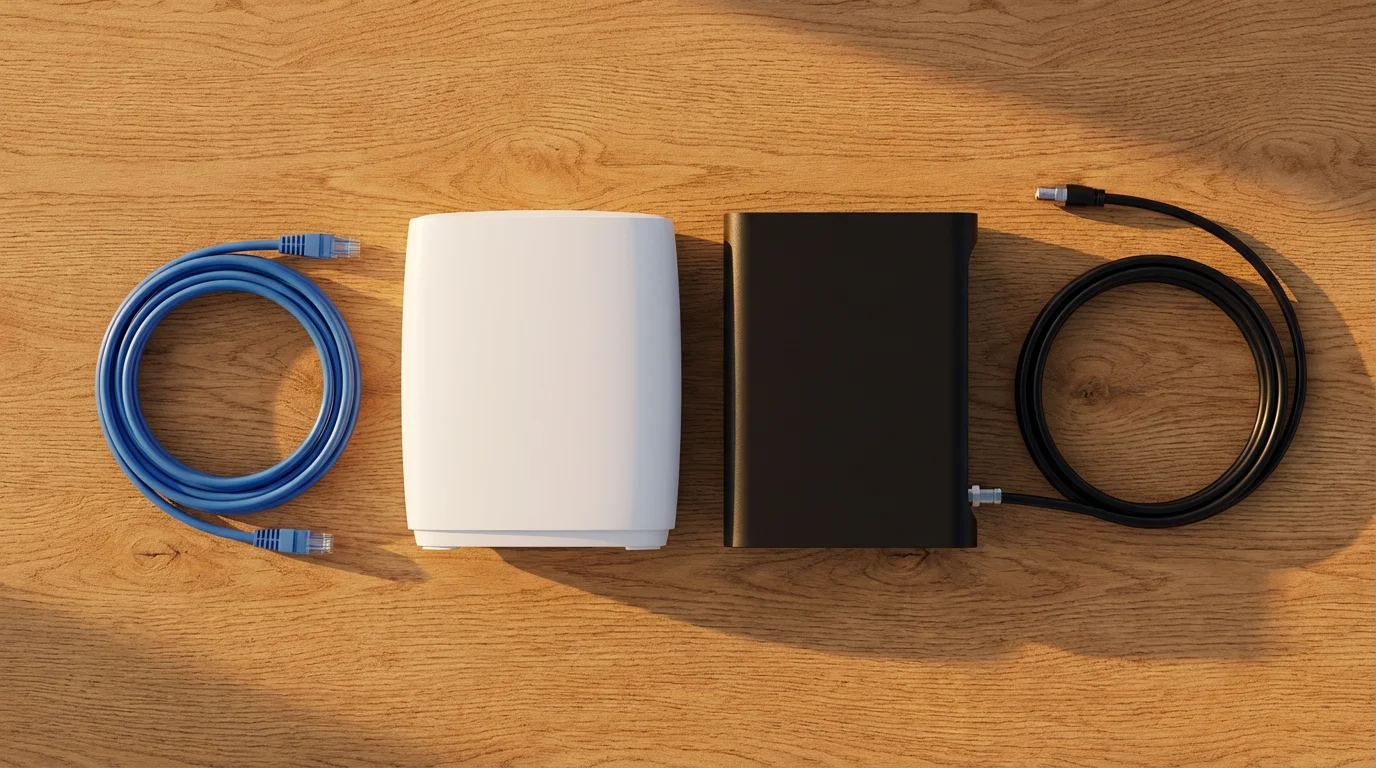
Equipment Check: Modems and Routers
Your internet service is only as good as the hardware delivering it. You can pay for Gigabit speed, but if your router is five years old and tucked inside a cabinet, you might only see 20 Mbps on your TV.
Stop Renting, Start Owning
Many ISPs charge $10 to $15 per month to rent their modem/router gateway. That is $120–$180 a year. You can buy a high-quality modem and router for roughly $150 total, meaning the equipment pays for itself in one year.
If you have Cable Internet: Look for a modem that supports “DOCSIS 3.1.” This is the modern standard that handles high speeds efficiently.
If you have Fiber: You typically must use the Optical Network Terminal (ONT) provided by the company, but you can often plug your own high-quality router into it to save on monthly rental fees.
Mesh Systems vs. Single Routers
If your Smart TV is in the bedroom or basement, far away from the router, you will experience buffering regardless of how fast your internet plan is. WiFi signals struggle to punch through walls and floors.
For homes larger than 1,500 square feet, consider a Mesh WiFi System (like Eero, Google Nest, or Netgear Orbi). These systems use multiple small units placed around the house to create a blanket of WiFi coverage, ensuring your streaming stick gets a strong signal in every room.

How to Negotiate or Switch Providers
The best prices are almost always reserved for “new customers.” If you are already with a provider (like Xfinity or Spectrum) and want to drop your TV package to go internet-only, they might try to raise your internet price.
Here is a strategy for handling the switch:
- Know the Competitor’s Price: Before you call to cancel cable, look up the “new customer” rate for internet at the competing provider in your area (e.g., if you have Xfinity, check AT&T or T-Mobile).
- Call Retention: Call your current provider and say, “I want to cancel my TV service. I see that [Competitor] offers 300 Mbps internet for $50. Can you match that rate for an internet-only plan?”
- Be Willing to Switch: If they refuse, schedule a cancellation date for the end of your billing cycle and sign up for the new provider.
Cord-cutting is about flexibility. Without a contract, you are free to jump between providers to chase the best reliability and price. Cord Cutters News frequently highlights that the savings from switching providers every two years can amount to hundreds of dollars.
Frequently Asked Questions
Is 100 Mbps fast enough for streaming 4K?
Yes, 100 Mbps is generally fast enough for streaming 4K content. A single 4K stream requires about 25 Mbps. With a 100 Mbps connection, you could theoretically run three 4K streams simultaneously and still have bandwidth left over for browsing the web.
Do I need a special router for streaming?
You do not need a “gaming” router, but you do need a modern router. Look for a router that supports at least WiFi 5 (802.11ac) or ideally WiFi 6 (802.11ax). These newer standards handle multiple devices better, prioritizing video traffic so your movie doesn’t stutter when someone else checks their email.
Does using a VPN slow down my streaming speed?
Yes, using a Virtual Private Network (VPN) will almost always slow down your connection speed slightly because your data has to travel through an extra server and be encrypted. However, if you have a fast baseline connection (300 Mbps+), the slowdown from a quality VPN usually isn’t noticeable enough to cause buffering.
What is a “good” latency or ping for live streaming?
Latency (measured in milliseconds, or ms) refers to the delay in data transfer. For watching on-demand content like Netflix, latency doesn’t matter much. However, for live sports or live TV services (like YouTube TV or Sling), a latency under 30ms is ideal. Fiber internet typically offers the lowest latency.
Disclaimer: Cable and streaming prices vary by location and change frequently. The cost comparisons in this article are estimates based on typical pricing. Your actual savings will depend on your current cable package, internet costs, and which streaming services you choose.




Leave a Reply