

Navigating the world of live TV streaming can feel overwhelming, especially when you are seeking to save money by cutting the cord from traditional cable or satellite. You face numerous options, each promising a wealth of entertainment, but the rising costs and complex features often lead to frustration. As an expert streaming and cord-cutting guide, I understand your need for clear, practical information to help you optimize your entertainment choices.
This comprehensive comparison focuses on three of the most popular live TV streaming services in the USA: YouTube TV, Hulu + Live TV, and Sling TV. We will demystify their offerings, break down their pricing, and highlight their unique strengths and weaknesses. By the end, you will have the actionable insights needed to choose the best live TV streaming service for your specific needs, ensuring you get the most value for your money.

Understanding Your Live TV Streaming Needs
Before diving into the specifics of YouTube TV, Hulu + Live TV, and Sling TV, take a moment to assess what truly matters to you in a live TV experience. This personalized approach saves you money and ensures satisfaction. Consider the following key factors:
- Must-Have Channels: List the absolute essential channels for your household, whether they are local broadcast networks, specific sports channels, or cable mainstays like CNN, HGTV, or Disney Channel.
- Budget: Determine your monthly spending limit for live TV. Prices for these services vary significantly, especially once you account for add-ons.
- Sports Priorities: Are you a dedicated sports fan? Specific teams, leagues (NFL, NBA, MLB, NHL, college sports, soccer), and regional sports networks (RSNs) impact which service best serves you.
- DVR Requirements: Do you need unlimited cloud storage to record shows and movies, or do a few dozen hours suffice? How long do you need recordings to last?
- Simultaneous Streams: How many people in your household need to watch different shows at the same time? This affects the number of concurrent streams a service allows.
- Ad Preference: Are you willing to watch commercials for a lower price, or do you prefer an ad-free experience, even if it costs more? Many streaming services are ad-supported, meaning they show commercials similar to traditional television.
“The best streaming service is the one that has the shows you actually watch and the features you actually use, not necessarily the one with the most content or the lowest price tag.”

Base Pricing and Core Features Comparison
The core offering of each service provides a starting point for your decision. While prices can fluctuate, understanding the base package helps you compare initial value. These services primarily offer live TV, meaning you watch video content over the internet as it airs, without a traditional cable or satellite subscription, a practice known as cord-cutting. Many people use a smart TV, which is a television with built-in internet connection and apps, or a streaming device like a Roku or Fire TV stick.
If you are strictly focused on minimizing costs, you might also want to explore the cheapest ways to stream live TV in 2024 to see how these services compare to budget-friendly alternatives.
Here is a direct comparison of the base plans for YouTube TV, Hulu + Live TV, and Sling TV. Prices listed are typical at the time of writing but can change frequently. Always check the provider’s website for the most current information.
| Feature | YouTube TV | Hulu + Live TV | Sling TV (Orange & Blue) |
|---|---|---|---|
| Base Monthly Price | Around $72.99 | Around $76.99 (with ads) | Around $60.00 |
| Included Channels (Approx.) | 100+ | 95+ | 45-50+ (Orange & Blue combined) |
| Simultaneous Streams | 3 | 2 (Unlimited at home with add-on) | 3 (Blue) / 1 (Orange) |
| Cloud DVR Storage | Unlimited, 9 months | Unlimited, 9 months | 50 hours (upgradeable) |
| On-Demand Library | Yes, limited | Extensive (Hulu library included) | Yes, limited |
| Ad-Free Option | No (for live TV) | Yes (for Hulu on-demand content with specific plan) | No (for live TV) |
As you can see, Sling TV offers a significantly lower entry point, but it comes with a more limited channel selection and DVR. Hulu + Live TV includes a robust on-demand library, which means you can watch whatever you want, whenever you want, from its extensive catalog. YouTube TV provides a strong all-around package, especially with its generous DVR.

Channel Lineups: What You Get
The channel lineup often serves as the primary deciding factor. Each service boasts a distinct selection of entertainment, news, and sports channels. Understanding these differences ensures you do not miss your favorite shows or games.
YouTube TV: This service generally offers a broad array of channels, including all major local broadcast networks (ABC, CBS, FOX, NBC) in most markets, along with popular cable channels like ESPN, TNT, CNN, Fox News, HGTV, Food Network, Disney Channel, and FX. Its strength lies in its comprehensive sports coverage, often including regional sports networks depending on your location, and a wide variety of general entertainment.
Hulu + Live TV: Hulu’s live TV offering integrates seamlessly with its vast on-demand library, providing access to hit shows and movies. Its live channel lineup is robust, comparable to YouTube TV, with major broadcast networks, popular cable channels such as ESPN, TNT, TBS, FX, Bravo, and CNN. The inclusion of the full Hulu on-demand catalog makes it particularly attractive for viewers who enjoy a blend of live television and extensive library content.
Sling TV: Sling TV takes a different approach with its Orange and Blue packages, which you can subscribe to individually or combine. Sling Orange focuses on ESPN channels and Disney-owned properties, allowing only one stream at a time. Sling Blue offers FOX and NBC local channels (in select markets), NFL Network, and a wider range of news and entertainment channels like Bravo and TLC, supporting three simultaneous streams. Combining both (Sling Orange & Blue) provides the most comprehensive, yet still more limited, lineup compared to YouTube TV or Hulu Live. Sling is known for its budget-friendly options, but this often means sacrificing some premium cable channels or certain local affiliates.
To help visualize these differences, here is a representation of key channel availability:
Channel comparison infographic showing major networks (ABC, CBS, NBC, FOX, ESPN, CNN, etc.) across YouTube TV, Hulu Live, Sling. Checkmarks for included channels, X for missing. Color-coded by category (broadcast, sports, news, entertainment). Clean grid layout, easy to scan. This visual aids in quickly discerning which service carries your essential networks.

Local Channel Availability: A Regional Challenge
Local channel availability, encompassing networks like ABC, CBS, FOX, NBC, and sometimes The CW or PBS, is a crucial consideration for many viewers. Unlike traditional cable, which usually carries all major local affiliates, live TV streaming services face complex agreements with local broadcasters. This means availability varies significantly by your geographical location.
How to Check Your Local Channels:
Every reputable live TV streaming service provides a tool on its website to check local channel availability simply by entering your zip code. This is an essential step before you commit to any subscription. Do not assume a service carries your local FOX affiliate because it carries FOX in another city. As PCMag reports, checking local channel availability by zip code is a critical step in choosing the right service.
- YouTube TV: Generally boasts strong local channel coverage across most of the USA, often including all four major broadcast networks.
- Hulu + Live TV: Also offers robust local channel availability, frequently matching or exceeding YouTube TV in many markets.
- Sling TV: This is where Sling TV’s budget-friendly model shows its limitations. Sling Blue includes FOX and NBC affiliates in select major metropolitan areas. Sling Orange does not include any local broadcast channels. If you rely heavily on ABC or CBS, Sling TV will likely require you to pair it with an antenna for over-the-air reception.
Always use the free trial period offered by these services to verify that your critical local channels are indeed available and stream reliably in your area. This proactive step prevents disappointment after subscribing.

Sports Streaming Showdown: NFL, NBA, MLB, and More
For many cord-cutters, sports are the primary reason to maintain a live TV subscription. Watching NFL, NBA, MLB, NHL, college sports, and soccer without cable requires careful consideration of channel lineups, regional sports networks (RSNs), and potential blackouts.
Football fans should pay close attention to which platforms offer the best live TV streaming service for NFL football to ensure they don’t miss any game day action.
YouTube TV: A strong contender for sports fans. It carries ESPN, ESPN2, ESPNU, Fox Sports 1 (FS1), Fox Sports 2 (FS2), CBS Sports Network (CBSSN), and usually your local ABC, CBS, FOX, and NBC affiliates for nationally televised games. YouTube TV has also been aggressive in securing regional sports networks, which are crucial for local NBA, MLB, and NHL games, although RSN availability continues to be a volatile area in streaming. Its base package is often comprehensive enough for many sports enthusiasts.
Hulu + Live TV: Another excellent option for sports, offering many of the same core sports channels as YouTube TV, including the full suite of ESPN networks, FS1, FS2, and your local broadcast channels. Like YouTube TV, its RSN availability depends on your region and ongoing carriage agreements. For soccer fans, Hulu sometimes offers a strong selection of international leagues through add-ons. According to Tom’s Guide, Hulu + Live TV is a top choice for sports fans because of its comprehensive channel lineup and integration with the ESPN+ streaming service.
Sling TV: Sling TV’s approach makes it a more fragmented, but potentially cheaper, option for sports.
- Sling Orange: Essential for ESPN channels (ESPN, ESPN2, ESPN3) which cover a vast array of college sports, NBA, and some MLB. Note that Sling Orange only allows one stream, a significant limitation for families.
- Sling Blue: Offers Fox Sports 1 (FS1), NFL Network, and in select markets, local FOX and NBC channels. This package is better for NFL and some regional sports.
Combining Orange & Blue provides a decent mix, but Sling TV generally lacks extensive RSN coverage compared to YouTube TV or Hulu + Live TV, meaning you might miss local team broadcasts. Sling also offers sports-specific add-on packages, such as the “Sports Extra” which can add channels like NBA TV, MLB Network, NHL Network, and SEC Network.
Sports Blackouts: A critical consideration. Due to broadcasting rights, some live games are “blacked out” in specific regions, meaning you cannot watch them through a streaming service even if it carries the channel. This most commonly affects local NBA, MLB, and NHL games when they air on an RSN in your area, or out-of-market NFL games. There is no streaming service that completely bypasses blackout rules legally.
Cloud DVR Capabilities: Recording and Playback
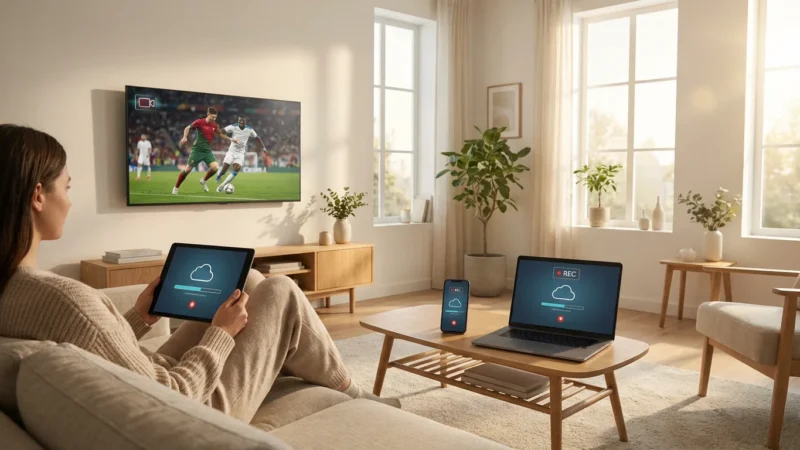
A Digital Video Recorder (DVR) is a critical feature for anyone who cannot watch their favorite shows live. Cloud DVR means your recordings are stored on the service’s servers, accessible from any compatible device. The convenience of recording and watching shows later is a significant benefit of modern live TV streaming.
YouTube TV: Offers an industry-leading cloud DVR. You get unlimited storage capacity, and your recordings remain available for nine months. This means you can record as many shows, movies, or sports events as you desire without worrying about running out of space. YouTube TV also generally allows you to fast-forward through commercials on recorded content, a highly valued feature.
Hulu + Live TV: Provides unlimited cloud DVR storage, with recordings kept for nine months, similar to YouTube TV. This is a recent upgrade, making Hulu’s DVR highly competitive. The base plan allows you to fast-forward through ads on most recorded content. Some content, particularly from its on-demand library, may have unskippable ads unless you subscribe to the ad-free Hulu on-demand tier.
Sling TV: Offers a more basic DVR experience in its base package. You receive 50 hours of cloud DVR storage, which is significantly less than its competitors. Recordings typically last indefinitely unless you delete them or exceed your storage limit. You can upgrade to 200 hours of DVR storage for an additional monthly fee, making it comparable in capacity to some older cable DVRs. Sling’s DVR generally allows fast-forwarding through commercials.
For heavy recorders or families with diverse viewing habits, YouTube TV and Hulu + Live TV provide superior DVR solutions with their unlimited storage. If you only record a few shows here and there, Sling’s base 50 hours might suffice, but you will need to manage your recordings carefully.
Add-Ons and Premium Channels: Customizing Your Experience
While the base packages provide a solid foundation, you can often enhance your live TV streaming experience with various add-on packages and premium channels. These allow you to tailor your subscription to your specific interests, but they also increase your total monthly cost.
Common Add-Ons:
- Sports Packages: All three services offer supplementary sports packages that include niche channels like NBA TV, MLB Network, NHL Network, Golf Channel, Tennis Channel, and various college sports networks. These are essential for dedicated fans who follow multiple leagues or specific college conferences.
- Entertainment Bundles: You might find add-ons for specific genres, like an “Entertainment Extra” with channels such as MTV, VH1, or Game Show Network.
- News & Information: Some services offer news add-ons for channels like BBC World News or Newsmax.
- International Packages: For viewers interested in content from specific regions or in other languages.
Premium Channels:
You can typically subscribe to popular premium movie and series channels directly through your live TV streaming service. This centralizes your billing and access. Common premium channels include:
- HBO Max: Home to new Warner Bros. films, HBO original series like “House of the Dragon,” and a vast library of movies and shows.
- Showtime: Features original series such as “Billions” and “Yellowjackets,” plus movies and documentaries.
- STARZ: Known for original series like “Outlander” and a rotating selection of movies.
- Cinemax: Offers a mix of movies, action series, and documentaries.
Adding these premium channels usually costs an additional $10-$15 per month per service. Carefully consider which ones truly enhance your viewing before adding them, as they quickly drive up your total monthly bill. For example, adding HBO Max and a sports package to YouTube TV can easily push your monthly cost above $100.
“Adding premium channels and extra packages significantly increases your monthly streaming bill. Before subscribing, ask yourself if you genuinely watch enough content on these channels to justify the added expense.”

Who Wins? Tailoring Your Choice
The “best” live TV streaming service is subjective; it depends entirely on your specific needs, budget, and viewing habits. There is no universal winner, but we can identify which service excels for particular types of viewers.
Best Budget Option: Sling TV
If saving money is your absolute top priority and you can live with a more limited channel lineup, Sling TV is your clear winner. Its Orange package (for ESPN) and Blue package (for FOX/NBC and NFL Network) start at a much lower price point than competitors. Even with the combined Orange & Blue package, it remains more affordable, especially if you do not need extensive local channel coverage or unlimited DVR. Sling is a strong choice for those making the initial leap into cord-cutting, allowing them to ease into streaming without a hefty monthly commitment.
Best for Families and Comprehensive Coverage: YouTube TV and Hulu + Live TV
These two services are neck and neck for families and viewers who desire a comprehensive cable-like experience without the cable bill. Both offer:
- Extensive channel lineups, including most major broadcast networks and popular cable channels.
- Excellent sports coverage, often including RSNs.
- Unlimited cloud DVR storage, making it easy for multiple family members to record their favorite shows.
- Multiple simultaneous streams (YouTube TV’s 3 streams are standard, Hulu’s base 2 streams can be upgraded to unlimited at home).
The choice between YouTube TV and Hulu + Live TV often comes down to minor channel differences, user interface preference, and whether the extensive Hulu on-demand library (included with Hulu + Live TV) holds significant value for you. If you already subscribe to Hulu for on-demand content, upgrading to Hulu + Live TV might be a natural fit.
Best for Sports Fans: YouTube TV and Hulu + Live TV
For serious sports fans who need broad national and regional sports coverage, YouTube TV and Hulu + Live TV generally provide the most robust offerings in their base packages. They are more likely to carry the RSNs crucial for local team coverage. While Sling TV offers ESPN and NFL Network, its fragmented nature and limited RSN availability can make it less ideal for a comprehensive sports viewing experience unless you are extremely selective about the sports you watch.
Ultimately, your decision should come after utilizing the free trials offered by these services. Test them out, check your local channels, see if your favorite shows are available, and get a feel for the user interface. This hands-on experience is invaluable for making an informed choice that truly saves you money and enhances your entertainment.
Frequently Asked Questions
Can I watch local channels like ABC, CBS, FOX, and NBC on these streaming services?
Once you have chosen your provider, make sure your internet connection is optimized and learn how to reduce buffering on live TV streaming services for an uninterrupted viewing experience.
Yes, all three services typically offer local channels, but availability varies significantly by your exact geographic location, determined by your zip code. YouTube TV and Hulu + Live TV generally have broader local channel coverage for all major networks. Sling TV’s local channel access is more limited, often only providing FOX and NBC in specific large markets via its Sling Blue package. Always check a service’s website with your zip code to confirm local channel availability before subscribing.
Do I need a special device to watch live TV streaming services?
You can watch live TV streaming services on a wide range of devices. This includes smart TVs with built-in apps, streaming devices like Roku, Amazon Fire TV, Apple TV, and Chromecast, gaming consoles (PlayStation, Xbox), smartphones, tablets, and web browsers on computers. You do not need a special device beyond what you likely already own.
What is “on-demand” content and how is it different from live TV?
Live TV streams programs as they air, just like traditional television. On-demand content, on the other hand, allows you to watch shows and movies whenever you want, similar to Netflix. Hulu + Live TV famously integrates its extensive on-demand library with its live TV offering. YouTube TV and Sling TV also offer some on-demand content, but typically a more limited selection compared to Hulu’s dedicated library.
Are there contracts or cancellation fees with these services?
No, one of the significant advantages of live TV streaming services over traditional cable is their flexibility. All three services operate on a month-to-month basis, meaning you can cancel or change your plan at any time without facing long-term contracts or cancellation fees. This allows you to easily switch providers if your needs change or if you find a better deal.
Disclaimer: Live TV streaming prices and channel lineups change frequently. Local channel availability varies by location. Always use the free trial to verify your local channels are included before committing. Sports blackout rules may affect some live events.







Leave a Reply